Plywood Brackets Revisited
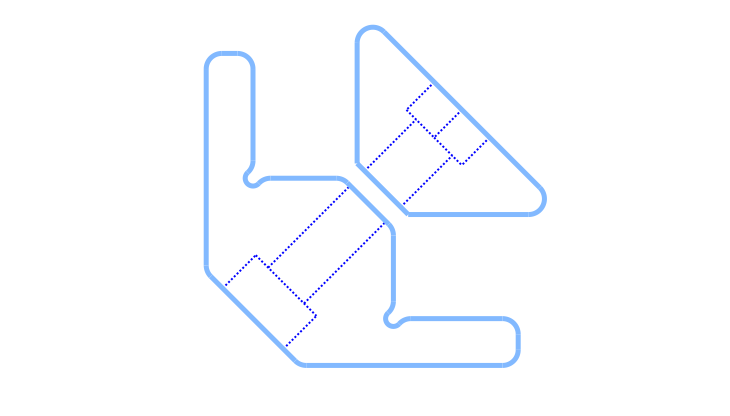
So much has changed in cadquery since I last used it in around 2022. Now We have the sketch API and assembly support.
Since I wasn’t completely happy with my original plywood brackets, I revised the model, this time taking advantage of the Sketch API.
The changes I wanted to implement were increased bearing area for the plywood board and small notches where the board corners rest. Since those locations act as stress concentrators, that’s where this structure tends to fail and relieving stress there is important.
This new version also makes better use of parametric features to simplify tailoring the bracket so it clamps the plywood board while leaving only a minimal gap between the 3d printed bracket and jaw after the screw is tightened. In the script, I called the parameter that controls this gap magic_margin.
While everything could arguably be implemented using the Fluent API, these stress-relief notches were much easier to create using the sketch tools.
#!/usr/bin/env python3

import cadquery as cq
from cadquery.vis import show

tab_length = 40.0
tab_thick = 6.0
ply_thick = 12.0
bracket_width = 16.0
outer_chamfer = 12.0
global_fillet = 2.0
relief_radius = 1.0
magic_margin = 0.5             # clearance on the diagonal gaps for proper clamping
inner_chamfer =  tab_thick+magic_margin

# bracket hardware parameters
cBore_diameter = 11.0          # mm, (M6 = 11.0 | M4 = 7.5)
screwHead_height = 6.0         # mm, (M6 = 6.0 | M4 = 4.0)
screw_clearance = 6.5          # mm, diameter of the screw + some clearance (M6 = 6.5 | M4 = 4.2)

# jaw hardware parameters
nut_thickness = 5.0            # mm, (M6 = 5.0 | M4 = 3.5)
nut_widthAcrossCorners = 11.5  # mm, (M6 = 11.5 | M4 = 8.5)

tabs  = (cq.Sketch()
         .segment((0, 0), (0, tab_length))
         .segment((0, tab_length), (tab_thick, tab_length))
         .segment((tab_thick, tab_length), (tab_thick, tab_thick))
         .segment((tab_thick, tab_thick), (tab_length, tab_thick))
         .segment((tab_length, tab_thick), (tab_length, 0))
         .close()
         .assemble()
         .clean()
         .reset()
         .vertices(s="<X and <Y").chamfer(outer_chamfer)
         )

ply_bearing = (cq.Sketch()
              .segment((tab_thick, tab_thick),
                       (tab_thick, 2*tab_thick+ply_thick))
              .segment((tab_thick, 2*tab_thick+ply_thick),
                       (2*tab_thick+ply_thick, 2*tab_thick+ply_thick))
              .segment((2*tab_thick+ply_thick, 2*tab_thick+ply_thick),
                       (2*tab_thick+ply_thick, tab_thick))
              .close()
              .assemble()
              .clean()
              .reset()
              .vertices(s=">X and >Y").chamfer(inner_chamfer)
              )

relief = (cq.Sketch().push([(tab_thick, 2*tab_thick+ply_thick),
                            (2*tab_thick+ply_thick, tab_thick)]).
          circle(relief_radius)
          )

final_sketch = tabs.face(ply_bearing, mode='a').face(relief, mode='s')

bracket = (cq.Workplane("front").placeSketch(final_sketch).extrude(bracket_width/2, both=True)
           .faces("<(1, 1, 0)").workplane(centerOption="CenterOfMass")
           .cboreHole(screw_clearance, cBore_diameter, screwHead_height)
           .edges("|Z").fillet(global_fillet)
           )

jaw  = (cq.Workplane("front").sketch()
        .segment((0, 0), (0, tab_length/1.5))
        .segment((0, tab_length/1.5), (tab_length/1.5, 0))
        .close()
        .assemble()
        .clean()
        .vertices(s="<X and <Y")
        .chamfer(inner_chamfer)
        .finalize()
        .extrude(bracket_width/2, both=True)
        .faces("<(1, 1, 0)").workplane(centerOption="CenterOfMass").hole(screw_clearance)
        .faces(">(1, 1, 0)").workplane(centerOption="CenterOfMass")
        .transformed(rotate=cq.Vector(0, 0, 90)).polygon(6, nut_widthAcrossCorners)
        .cutBlind(-nut_thickness)
        .edges("|Z and >Y").fillet(global_fillet)
        .edges("|Z and >X").fillet(global_fillet)
       )

jaw = jaw.translate((19.0, 19.0, 0))

assy = cq.Assembly(name="plywood-connectors")
assy.add(bracket, color=cq.Color(130/255.0, 185/255.0, 255/255.0), name="bracket")
assy.add(jaw, color=cq.Color(150/255.0, 255/255.0, 41/255.0), name="jaw")

show(assy)
- The cool line to pay attention here is the following one, where sketches are added and subtracted from the other.
final_sketch = tabs.face(ply_bearing, mode='a').face(relief, mode='s')
- Also usefull to know that you can use vector directions to select a face, This was used many times on the script as some important faces are oriented at 45 degrees. For example in:
.faces("<(1, 1, 0)").workplane(centerOption="CenterOfMass").hole(screw_clearance)
The assembly (assy) part was not necessary for such a simple model, but I included here as simple example of how to call it.
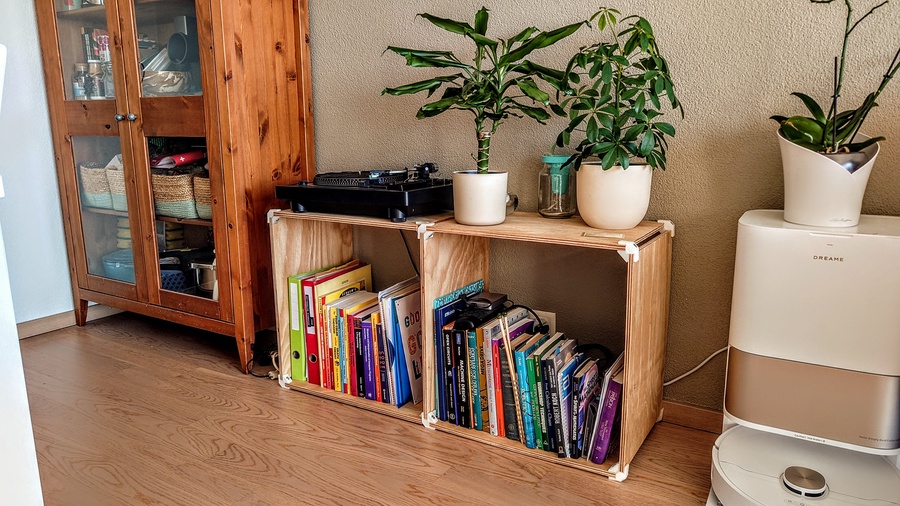
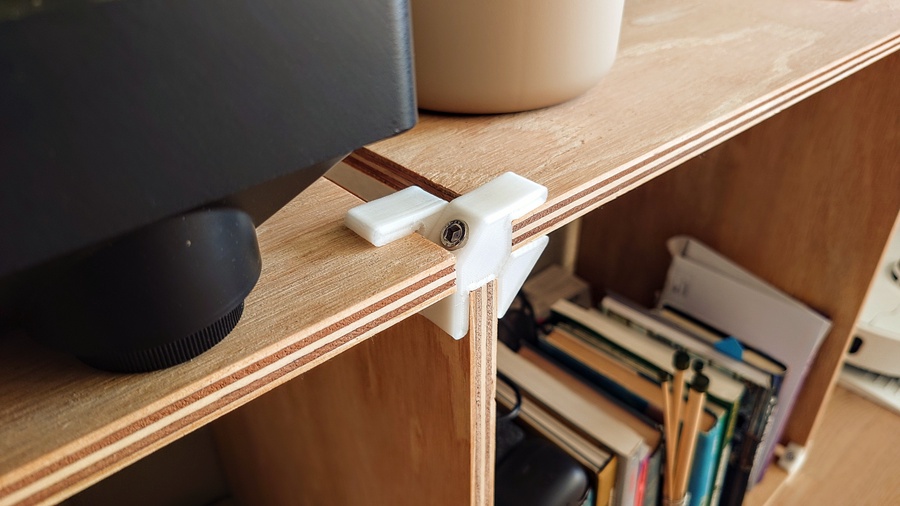
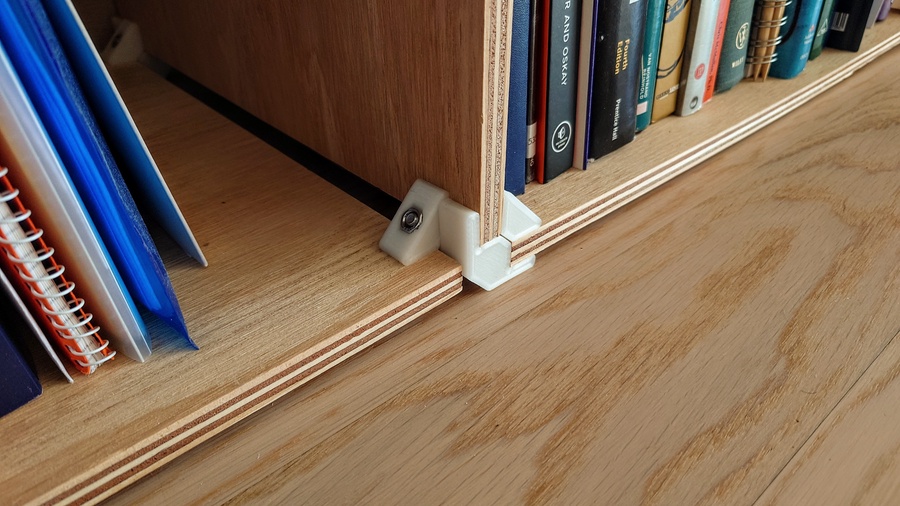
I used 12 mm plywood, 6 mm hardware and a special high toughness PLA. Considering it has no bracing, it’s reasonably strong and stable. Overall, I’m very happy with it — my turntable, along with books and loads of random stuff, regularly sit on top of it without any issues.
📎 Download: Plywood Bracket - M6 step file